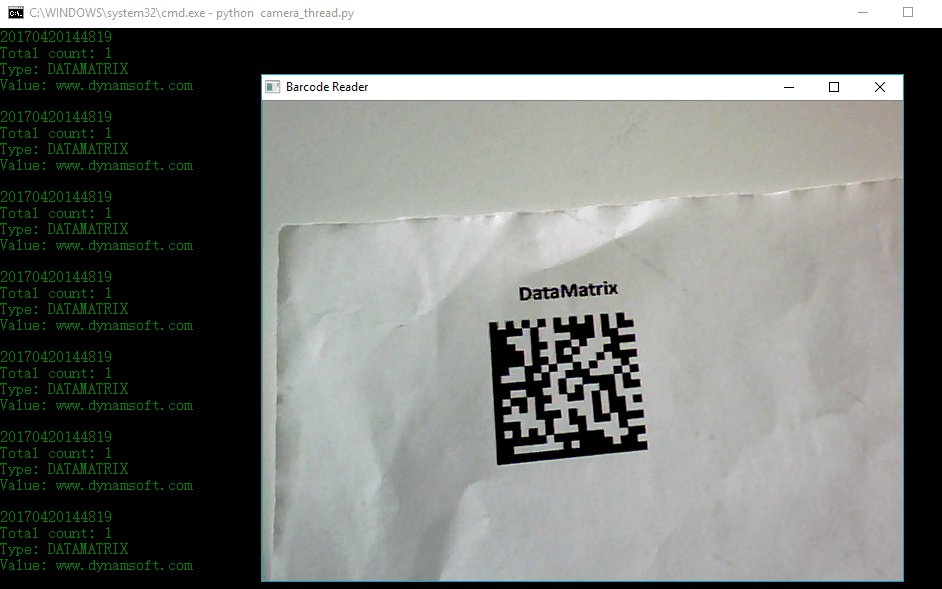
DBR 5.x — это большой скачок по сравнению с версией 4.x. Много кода было переработано и оптимизировано. Это руководство призвано помочь разработчикам ознакомиться с новыми API и узнать, как создать приложение штрих-кода Python с помощью Dynamsoft Barcode Reader SDK 5.0.
Предпосылки
- Dynamsoft Barcode Reader 5.0 для Windows
- Питон 2.7.0
- OpenCV 2.4.10
- Windows 10
- USB-веб-камера
Расширение штрих-кода Python
Создайте dbr.c и включите три файла заголовков.
#include <Python.h>
#include "DynamsoftBarcodeReader.h"
#include <ndarraytypes.h>
DBR 5.x определяет все структуры данных с помощью одного заголовочного файла, который более удобочитаем, чем несколько заголовочных файлов в DBR 4.x.
Определите методы Python и инициализируйте модуль Python:
static PyMethodDef Methods[] =
{
{"create", create, METH_VARARGS, NULL},
{"destroy", destroy, METH_VARARGS, NULL},
{"initLicense", initLicense, METH_VARARGS, NULL},
{"decodeFile", decodeFile, METH_VARARGS, NULL},
{"decodeBuffer", decodeBuffer, METH_VARARGS, NULL},
{NULL, NULL, 0, NULL}
};
PyMODINIT_FUNC
initdbr(void)
{
(void) Py_InitModule("dbr", Methods);
}
Установите глобальный обработчик DBR:
#define DBR_NO_MEMORY 0
#define DBR_SUCCESS 1
void* hBarcode = NULL;
/**
* Create DBR instance
*/
static int createDBR()
{
if (!hBarcode) {
hBarcode = DBR_CreateInstance();
if (!hBarcode)
{
printf("Cannot allocate memory!\n");
return DBR_NO_MEMORY;
}
}
return DBR_SUCCESS;
}
/**
* Destroy DBR instance
*/
static void destroyDBR()
{
if (hBarcode) {
DBR_DestroyInstance(hBarcode);
}
}
Установите действующую лицензию DBR:
static PyObject *
initLicense(PyObject *self, PyObject *args)
{
if (!createDBR())
{
return NULL;
}
char *pszLicense;
if (!PyArg_ParseTuple(args, "s", &pszLicense)) {
return NULL;
}
int ret = DBR_InitLicenseEx(hBarcode, pszLicense);
return Py_BuildValue("i", ret);
}
Обнаружение штрих-кодов на изображении, захваченном OpenCV API:
static PyObject *
decodeBuffer(PyObject *self, PyObject *args)
{
if (!createDBR())
{
return NULL;
}
PyObject *o;
int iFormat;
if (!PyArg_ParseTuple(args, "Oi", &o, &iFormat))
return NULL;
PyObject *ao = PyObject_GetAttrString(o, "__array_struct__");
if ((ao == NULL) || !PyCObject_Check(ao)) {
PyErr_SetString(PyExc_TypeError, "object does not have array interface");
return NULL;
}
PyArrayInterface *pai = (PyArrayInterface*)PyCObject_AsVoidPtr(ao);
if (pai->two != 2) {
PyErr_SetString(PyExc_TypeError, "object does not have array interface");
Py_DECREF(ao);
return NULL;
}
// Get image information
char *buffer = (char*)pai->data; // The address of image data
int width = pai->shape[1]; // image width
int height = pai->shape[0]; // image height
int size = pai->strides[0] * pai->shape[0]; // image size = stride * height
// Initialize Dynamsoft Barcode Reader
int iMaxCount = 0x7FFFFFFF;
SBarcodeResultArray *pResults = NULL;
DBR_SetBarcodeFormats(hBarcode, iFormat);
DBR_SetMaxBarcodesNumPerPage(hBarcode, iMaxCount);
// Detect barcodes
int iRet = DBR_DecodeBufferEx(hBarcode, buffer, width, height, width * 3, IPF_RGB_888, &pResults);
// Wrap results
PyObject *list = createPyResults(pResults);
Py_DECREF(ao);
return list;
}
Как построить расширение
Установите среду Visual Studio:
- Visual Studio 2010 (VS10): УСТАНОВИТЬ VS90COMNTOOLS=%VS100COMNTOOLS%
- Visual Studio 2012 (VS11): УСТАНОВИТЬ VS90COMNTOOLS=%VS110COMNTOOLS%
- Visual Studio 2013 (VS12): УСТАНОВИТЬ VS90COMNTOOLS=%VS120COMNTOOLS%
- Visual Studio 2015 (VS14): УСТАНОВИТЬ VS90COMNTOOLS=%VS140COMNTOOLS%
Если вы используете Visual Studio 2015, используйте следующую команду:
SET VS90COMNTOOLS=%VS140COMNTOOLS%
Добавьте каталоги файлов заголовков DBR 5.0 и NumPy в setup.py:
from distutils.core import setup, Extension
module_dbr = Extension('dbr',
sources = ['dbr.c'],
include_dirs=["F:\\Python27\\Lib\\site-packages\\numpy\\core\\include\\numpy", 'e:\\Program Files (x86)\\Dynamsoft\\Barcode Reader 5.0\\Components\\C_C++\\Include'],
library_dirs=['e:\\Program Files (x86)\\Dynamsoft\Barcode Reader 5.0\\Components\\C_C++\\Lib'],
libraries=['DBRx86'])
setup (name = 'DynamsoftBarcodeReader',
version = '1.0',
description = 'Python barcode extension',
ext_modules = [module_dbr])
Соберите расширение Python:
python setup.py build install
Скопируйте Dynamsoft\Barcode Reader 5.0\Components\C_C++\Redist\DynamsoftBarcodeReaderx86.dll в Python27\Lib\site-packages.
Простой считыватель штрих-кодов Python
Создайте файл camera.py.
Импортируйте OpenCV и DBR:
import cv2
import dbr
Откройте камеру по умолчанию:
vc = cv2.VideoCapture(0)
Установите пробную или полную лицензию SDK. С недействительной лицензией SDK вернет неполный результат:
dbr.initLicense("t0260NQAAALGw+aCAePXdOS3p1xkqT5hesExKVpEe7NiIhkdlUz/Jvx8km3ItI0ykUcmeP67BYVlJ2PDW++bjSYmDLmyMgOmmvc0mdvhlSy500kqnLoBAL+TybcdAP42b5p5WehK9Gsmweqi+ydK6B0KaUNQMDJZ1DrnhDXZ209pfpJoVybPk/CMcDKXaF2oRLKEOYVscXTF6mbiWUnMP5lj4OdTvFa0eVRcE0q9BckiqYgUZLK4L6DVgRXWRL5nRPtvEtd+qZe6psu0JZ7HEPhsbodfAVH2G436z1QahLGJXdQCoQv8UQ/quGQP2wCWemfueeKJ4Y6WsvEvmkUpizbTOE3Njjaw=")
Захват кадра:
rval, frame = vc.read();
Чтение штрих-кодов:
results = dbr.decodeBuffer(frame, formats)
if (len(results) > 0):
print(get_time())
print("Total count: " + str(len(results)))
for result in results:
print("Type: " + result[0])
print("Value: " + result[1] + "\n")
Как запустить приложение
Подключите веб-камеру USB к компьютеру.
Запустите camera.py:
python camera.py