Видеоигры сильно изменились за последние годы. Почти десять лет назад (когда я не знал, как пишется собственное имя😂) моей любимой мобильной игрой была «space-impact»; в которую я играл на мобильном телефоне Nokia.
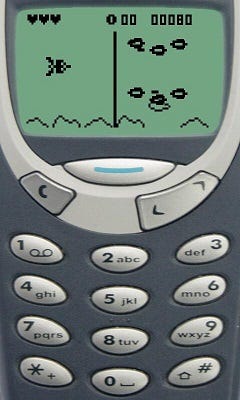
Было легко и весело!
Поэтому я подумал сделать игру, похожую на «космический удар», но с другой концепцией, используя pygame.
Pygame – это бесплатная кроссплатформенная библиотека с открытым исходным кодом для разработки мультимедийных приложений, таких как видеоигры, с использованием Python.
Итак, давайте вместе сделаем нашу собственную игру!!
Фон «Заклинание синигами»:
Что такое Шинигами? Синигами (死神, буквально «бог смерти») — это боги или сверхъестественные духи, призывающие людей к смерти в определенных аспектах японской культуры. Синигами описывают как монстров, помощников и порождений тьмы.
Итак, у нас есть воин, которого преследуют несколько синигами; и воин должен использовать заклинание, чтобы держать их подальше. Если произнесенное заклинание достигает синигами, воин получает очко, и шинигами возвращается на некоторое время. Цель здесь состоит в том, чтобы заработать как можно больше очков, накладывая заклинание на синигами.
Как играть?
Воин произносит заклинание, когда вы нажимаете пробел, и перемещается влево или вправо, чтобы изменить свое положение с помощью клавиш со стрелками вправо и влево.
Что нам потребуется для установки?
Питон и Пигейм
Visual Studio Code (или любой другой редактор кода, который вам нравится)
Вы можете скачать Python с https://www.python.org/downloads/
Затем вам нужно установить pygame (вы можете использовать эту команду на своем терминале; pip install pygame).
Теперь приступим к кодированию😁
import math
import random
import pygame
from pygame import mixer

# Intialize the pygame
pygame.init()

# create the screen
screen = pygame.display.set_mode((800, 600))

# Background
background = pygame.image.load('battleground.jpg')

# Sound
mixer.music.load("happysound.mp3")
mixer.music.play(-1)

# Caption and Icon
pygame.display.set_caption("Shinigami Spell")
icon = pygame.image.load('sanfire.png')
pygame.display.set_icon(icon)

# warrior
warriorImg = pygame.image.load('warrior.png')
warriorX = 370
warriorY = 530
warriorX_change = 0

# Shinigami
ShinigamiImg = []
ShinigamiX = []
ShinigamiY = []
ShinigamiX_change = []
ShinigamiY_change = []
num_of_Shinigamies = 5

for i in range(num_of_Shinigamies):
    ShinigamiImg.append(pygame.image.load('sanfire.png'))
    ShinigamiX.append(random.randint(0, 736))
    ShinigamiY.append(random.randint(30, 150))
    ShinigamiX_change.append(4)
    ShinigamiY_change.append(40)

# Spell

# Ready - You can't see the spell on the screen
# Fire - The spell is currently moving

spellImg = pygame.image.load('fireworks.png')
spellX = 0
spellY = 480
spellX_change = 0
spellY_change = 5
spell_state = "ready"

# Score

score_value = 0
font = pygame.font.Font('freesansbold.ttf', 32)

textX = 10
testY = 10

# Game Over
over_font = pygame.font.Font('freesansbold.ttf', 64)


def show_score(x, y):
    score = font.render("Score : " + str(score_value), True, (255, 255, 255))
    screen.blit(score, (x, y))


def game_over_text():
    over_text = over_font.render("GAME OVER", True, (255, 255, 255))
    screen.blit(over_text, (200, 250))


def warrior(x, y):
    screen.blit(warriorImg, (x, y))


def Shinigami(x, y, i):
    screen.blit(ShinigamiImg[i], (x, y))


def fire_spell(x, y):
    global spell_state
    spell_state = "fire"
    screen.blit(spellImg, (x + 16, y + 10))


def isCollision(ShinigamiX, ShinigamiY, spellX, spellY):
    distance = math.sqrt(math.pow(ShinigamiX - spellX, 2) + (math.pow(ShinigamiY - spellY, 2)))
    if distance < 27:
        return True
    else:
        return False


# Game Loop
running = True
while running:

    # RGB = Red, Green, Blue
    screen.fill((0, 0, 0))
    # Background Image
    screen.blit(background, (0, 0))
    for event in pygame.event.get():
        if event.type == pygame.QUIT:
            running = False

        # if keystroke is pressed check whether its right or left
        if event.type == pygame.KEYDOWN:
            if event.key == pygame.K_LEFT:
                warriorX_change = -5
            if event.key == pygame.K_RIGHT:
                warriorX_change = 5
            if event.key == pygame.K_SPACE:
                if spell_state=="ready":
                    spellSound = mixer.Sound("magicspellmusic.mp3")
                    spellSound.play()
                    # Get the current x cordinate of the spaceship
                    spellX = warriorX
                    fire_spell(spellX, spellY)

        if event.type == pygame.KEYUP:
            if event.key == pygame.K_LEFT or event.key == pygame.K_RIGHT:
                warriorX_change = 0

    # 5 = 5 + -0.1 -> 5 = 5 - 0.1
    # 5 = 5 + 0.1

    warriorX += warriorX_change
    if warriorX <= 0:
        warriorX = 0
    elif warriorX >= 736:
        warriorX = 736

    # Shinigami Movement
    for i in range(num_of_Shinigamies):

        # Game Over
        if ShinigamiY[i] > 440:
            for j in range(num_of_Shinigamies):
                ShinigamiY[j] = 2000
            game_over_text()
            break

        ShinigamiX[i] += ShinigamiX_change[i]
        if ShinigamiX[i] <= 0:
            ShinigamiX_change[i] = 1
            ShinigamiY[i] += ShinigamiY_change[i]
        elif ShinigamiX[i] >= 736:
            ShinigamiX_change[i] = -1
            ShinigamiY[i] += ShinigamiY_change[i]

        # Collision
        collision = isCollision(ShinigamiX[i], ShinigamiY[i], spellX, spellY)
        if collision:
            explosionSound = mixer.Sound("fireball.mp3")
            explosionSound.play()
            spellY = 480
            spell_state = "ready"
            score_value += 1
            ShinigamiX[i] = random.randint(0, 736)
            ShinigamiY[i] = random.randint(50, 150)

        Shinigami(ShinigamiX[i], ShinigamiY[i], i)

    # spell Movement
    if spellY <= 0:
        spellY = 480
        spell_state = "ready"

    if spell_state =="fire":
        fire_spell(spellX, spellY)
        spellY -= spellY_change

    warrior(warriorX, warriorY)
    show_score(textX, testY)
    pygame.display.update()
Нам понадобятся некоторые изображения и звуки для данной игры.
Вы можете загрузить ресурсы и исходный код из этого репозитория GitHub:

